

Employee IT Onboarding and Offboarding Checklist: How to Protect Your Business


Hiring a new employee or managing someone's departure involves more than paperwork and HR responsibilities. Every employee needs access to technology, applications, and company information to perform their job. When those resources aren't properly managed, businesses can experience productivity issues, unnecessary expenses, and cybersecurity risks.
An effective employee IT onboarding and offboarding process ensures new hires have the tools they need while preventing former employees from retaining access to sensitive systems.
For small and medium-sized businesses, establishing a consistent process is especially important as teams grow, employees work remotely, and organizations adopt more cloud-based applications.
This employee IT onboarding and offboarding checklist explains the essential steps businesses should follow and how professional managed IT support services can simplify employee technology management.
Why Employee IT Onboarding and Offboarding Matter
Every employee represents another collection of devices, accounts, permissions, and software licenses that must be managed.
Without a standardized process, businesses can encounter several problems:
New employees waiting days for computers or application access
Former employees retaining access to company accounts
Unused software licenses creating unnecessary expenses
Sensitive business information remaining accessible through outdated permissions
Inconsistent security settings across employee devices
These issues become more complicated as businesses add remote employees, multiple locations, and cloud applications.
A documented process helps HR, management, and IT teams coordinate responsibilities while maintaining appropriate security controls.
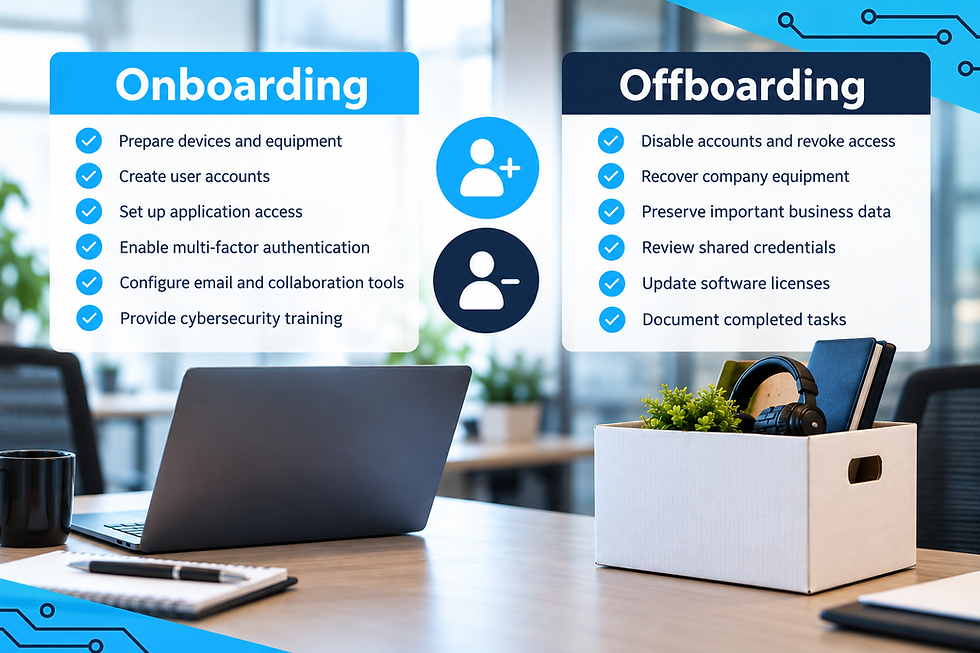
Employee IT Onboarding Checklist: 6 Essential Steps
A successful IT onboarding process should begin before an employee's first day. Preparing accounts, devices, and permissions in advance allows new hires to become productive without unnecessary delays.
1. Prepare Employee Devices and Equipment
Determine which technology the employee needs based on their responsibilities.
This may include a laptop, desktop, monitors, business phone, or specialized equipment.
Before deployment, devices should receive necessary software installations, security configurations, operating system updates, and endpoint protection.
Businesses should also document assigned equipment to maintain accurate technology inventory records.
2. Create User Accounts and Configure Access
New employees typically require access to email, business applications, shared files, and internal systems.
However, not every employee needs access to everything.
Using role-based permissions helps ensure employees receive only the access necessary to perform their responsibilities.
For organizations using Microsoft 365 and other cloud platforms, professional cloud and hosting services can support secure application management and user access.
3. Enable Multi-Factor Authentication
Multi-factor authentication (MFA) adds another layer of protection by requiring additional verification beyond a password.
Businesses should establish MFA requirements during onboarding rather than allowing employees to configure security independently.
This is particularly important for email, cloud applications, remote access, and accounts containing sensitive information.
Improperly configured authentication and permissions can create serious security gaps. Get IT Right Solutions explores these concerns in its article on Microsoft 365 misconfigurations.
4. Configure Email and Collaboration Tools
Employees need reliable access to communication platforms from their first day.
Depending on the organization, this may involve configuring:
Business email accounts and signatures
Microsoft Teams or other collaboration platforms
Shared calendars and distribution lists
SharePoint or shared document repositories
Business phone systems
Proper configuration helps employees communicate effectively while maintaining consistent access and security policies.
5. Provide Cybersecurity Awareness Training
Even properly configured technology can be vulnerable when employees don't understand common cybersecurity threats.
New hires should receive guidance on recognizing phishing attempts, protecting passwords, handling sensitive information, and reporting suspicious activity.
Training should continue beyond onboarding to reinforce safe practices.
For additional information, read Why Employee Cybersecurity Training Is Just as Important as Antivirus Software.
6. Verify Everything Before the First Day
Before onboarding is complete, IT teams should confirm that devices, accounts, applications, and security controls function correctly.
Testing access in advance helps prevent new employees from spending their first day troubleshooting avoidable technology problems.
A completed checklist also creates documentation showing which resources were assigned and
configured.
Employee IT Offboarding Checklist: 6 Critical Steps
While onboarding focuses on productivity, employee IT offboarding focuses on protecting company information, recovering resources, and removing unnecessary access.
An incomplete offboarding process can leave accounts active long after an employee departs.
1. Establish an Offboarding Timeline
HR and IT should coordinate when employee access needs to be removed.
For planned departures, IT teams can prepare necessary changes in advance. For unexpected departures, organizations should have a process for promptly securing accounts.
The timing should reflect company policies, business requirements, and the circumstances surrounding the departure.
2. Disable Accounts and Revoke Access
One of the most important offboarding steps is ensuring former employees can no longer access company systems.
This includes:
Business email and Microsoft 365 accounts
Cloud applications and software platforms
VPN and remote access connections
Internal networks and shared resources
Administrative accounts and privileged permissions
IT teams should also revoke active sessions, authentication tokens, and other persistent access where supported.
3. Recover Company-Owned Equipment
Businesses should maintain records of company devices assigned to each employee.
During offboarding, laptops, phones, security keys, access cards, and other equipment should be returned or accounted for.
Recovered devices should be inspected, securely prepared for reassignment, and updated before another employee uses them.
4. Preserve Important Business Information
Before deleting accounts or removing licenses, determine whether the employee's email, documents, or other business records must be retained.
Organizations may need to transfer ownership of shared files, preserve important communications, or reassign business applications.
Retention decisions should follow company policies and applicable legal requirements.
5. Review Shared Credentials and Permissions
Disabling an individual account does not necessarily remove every form of access.
Employees may have used shared credentials, third-party applications, or systems outside centralized account management.
IT teams should identify these resources and rotate credentials or update permissions when necessary.
This is particularly important for employees with administrative responsibilities or access to sensitive information.
6. Update Technology Inventory and Licensing
Once access has been removed and equipment recovered, businesses should update their records.
Unused software licenses may be reassigned or canceled when appropriate, helping reduce unnecessary technology spending.
Accurate documentation also makes future onboarding easier and supports better IT planning.
Common Employee Onboarding and Offboarding Mistakes
Even businesses with established HR procedures can overlook technology-related responsibilities.
Common mistakes include creating accounts without standardized permissions, failing to document employee devices, overlooking third-party applications, and delaying access removal.
Another frequent issue is assigning responsibility to multiple departments without clearly defining who completes each task.
For example, HR may confirm an employee's departure while IT remains unaware that access should be disabled.
Creating a shared checklist with designated responsibilities helps prevent these communication gaps.
How Managed IT Services Simplify Employee Technology Management
Managing employee technology becomes increasingly complex as businesses grow.
A company with 10 employees may be able to handle onboarding informally. However, as the organization expands to 30, 50, or more employees, inconsistent processes can create additional work and security concerns.
Professional managed IT services can help businesses establish repeatable processes for device preparation, account management, technical support, cybersecurity, and ongoing maintenance.
Instead of handling each employee transition independently, businesses can coordinate with an experienced IT team that understands their systems and requirements.
Get IT Right Solutions provides proactive monitoring, responsive helpdesk assistance, cybersecurity protection, vendor management, and technology guidance through its managed IT services.
To understand how these services support daily operations, explore What Is Included in Managed IT Services and How Get IT Right Solutions Adds Value.
Build a More Secure Employee IT Onboarding and Offboarding Process
Employee transitions are a normal part of business operations, but technology management should never be an afterthought.
A structured employee IT onboarding and offboarding checklist helps businesses prepare new hires, maintain appropriate access controls, protect company information, and reduce unnecessary technology expenses.
The goal is to create a consistent process that supports employees throughout their time with the organization while keeping business systems secure.
Get IT Right Solutions helps businesses simplify technology management through reliable IT support, cybersecurity, cloud solutions, and proactive maintenance.
Contact Get IT Right Solutions to learn how managed IT services can support your employees and protect your business.


Comments